Cluster Networking
Networking is a central part of Kubernetes, but it can be challenging to understand exactly how it is expected to work. There are 4 distinct networking problems to address:
- Highly-coupled container-to-container communications: this is solved by
Pods and
localhostcommunications. - Pod-to-Pod communications: this is the primary focus of this document.
- Pod-to-Service communications: this is covered by Services.
- External-to-Service communications: this is also covered by Services.
Kubernetes is all about sharing machines among applications. Typically, sharing machines requires ensuring that two applications do not try to use the same ports. Coordinating ports across multiple developers is very difficult to do at scale and exposes users to cluster-level issues outside of their control.
Dynamic port allocation brings a lot of complications to the system - every application has to take ports as flags, the API servers have to know how to insert dynamic port numbers into configuration blocks, services have to know how to find each other, etc. Rather than deal with this, Kubernetes takes a different approach.
To learn about the Kubernetes networking model, see here.
Kubernetes IP address ranges
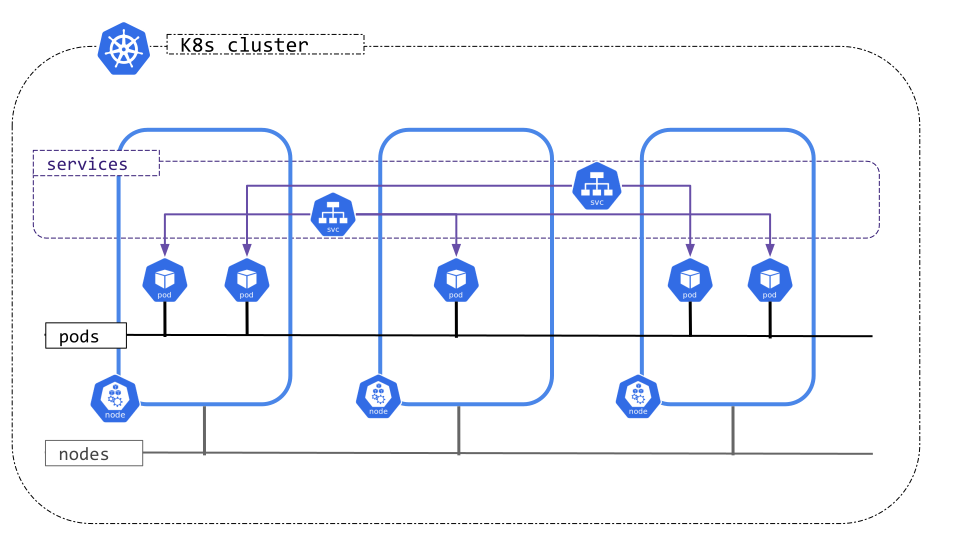
Kubernetes clusters require non-overlapping IP address ranges for Pods, Services, and Nodes. Because Kubernetes networking is pluggable, the source of these ranges depends on your cluster's configuration:
- Pods: The network plugin (CNI) or cloud provider defines and assigns the IP address ranges for Pods.
- Services: The
kube-apiserveris configured to assign IP addresses for Services (typically via the--service-cluster-ip-rangeflag). - Nodes: The cloud provider or the cluster administrator defines the IP ranges available for Nodes.
Before changing these ranges, consult the documentation for your CNI (such as Calico or Cilium) or your cloud provider to identify where these IP address ranges are managed for your specific environment.
Cluster networking types
Kubernetes clusters, attending to the IP families configured, can be categorized into:
- IPv4 only: The network plugin, kube-apiserver and kubelet/cloud-controller-manager are configured to assign only IPv4 addresses.
- IPv6 only: The network plugin, kube-apiserver and kubelet/cloud-controller-manager are configured to assign only IPv6 addresses.
- IPv4/IPv6 or IPv6/IPv4 dual-stack:
- The network plugin is configured to assign IPv4 and IPv6 addresses.
- The kube-apiserver is configured to assign IPv4 and IPv6 addresses.
- The kubelet or cloud-controller-manager is configured to assign IPv4 and IPv6 address.
- All components must agree on the configured primary IP family.
Kubernetes clusters only consider the IP families present on the Pods, Services and Nodes objects,
independently of the existing IPs of the represented objects. Per example, a server or a pod can have multiple
IP addresses on its interfaces, but only the IP addresses in node.status.addresses or pod.status.ips are
considered for implementing the Kubernetes network model and defining the type of the cluster.
How to implement the Kubernetes network model
The network model is implemented by the container runtime on each node. The most common container runtimes use Container Network Interface (CNI) plugins to manage their network and security capabilities. Many different CNI plugins exist from many different vendors. Some of these provide only basic features of adding and removing network interfaces, while others provide more sophisticated solutions, such as integration with other container orchestration systems, running multiple CNI plugins, advanced IPAM features etc.
See this page for a non-exhaustive list of networking addons supported by Kubernetes.
What's next
The early design of the networking model and its rationale are described in more detail in the networking design document. For future plans and some on-going efforts that aim to improve Kubernetes networking, please refer to the SIG-Network KEPs.